
Digital Fishing Licenses Coming Soon
Replace paper permits with photo-verified digital licenses and QR codes that bailiffs can check in seconds.
The Problem with Paper Permits
Most fishing clubs in Ireland still issue paper permits. You go to a tackle shop or club, pay for a license, and get a piece of paper. Simple enough — but that piece of paper can easily be:
- Shared with someone else who didn't pay
- Lost or damaged at the waterside
- Photocopied and used multiple times
- Filled in with a fake name
When a bailiff or water keeper checks someone fishing, it's very hard to know if the permit actually belongs to that person. There's no photo, no way to verify identity, and no record if the paper gets lost.
The Solution
Angling Ireland's digital fishing licenses replace paper permits with a digital license on the angler's phone. Each license includes the angler's photo and a unique QR code — so a bailiff can verify in seconds that the person fishing is the person who bought the permit.
Paper vs Digital
| Paper Permit | Digital License | |
|---|---|---|
| Identity check | No photo | Photo verified |
| Can be shared | Easily | Photo prevents it |
| Can be lost | Yes | Always on phone |
| Verification speed | Manual read | Instant QR scan |
| Sell online | No | 24/7 |
| Member database | No records | Full database |
In This Guide
Key Benefits
Part 1: For Club Admins
Setting up digital licenses for your club
Set Up License Types
First, you'll set up the types of fishing licenses your club offers. Every club is different — some sell day permits, others sell seasonal rod licenses, guest passes, or junior permits.
From your club admin panel, go to Licenses and click "Add License Type". For each license type, you set:
- Name — what the license is called (e.g., "Day Permit", "Season Rod License")
- Price — how much it costs
- Duration — how long it's valid (1 day, 1 week, full season, etc.)
- Season dates — when this license can be used (e.g., 1 March – 30 September)
- Description — any rules or conditions that apply

You can add as many license types as you need. They'll appear on your club's public license shop where anglers can buy them online.
Tip: Think about the different types of anglers who fish your waters — locals, visitors, juniors, seniors. Offering a range of license types makes it easy for everyone to find the right option.
Assign Bailiffs
Bailiffs and water keepers are the people who check licenses on the water. You need to assign them in the system so they can use the QR scanner and manual search tools.

From Licenses → Bailiffs, you can:
- Add bailiffs from your existing club members
- Set active/inactive — temporarily disable a bailiff without removing them
- Multiple bailiffs — assign as many as you need
Once assigned, bailiffs get access to the QR scanner and license search tools on their phone.
Tip: Bailiffs must be existing members of your club on Angling Ireland. Make sure they've created an account and joined your club first.
Manage Licenses & Sales
Your License Dashboard gives you a complete overview of all licenses sold, who's fishing your waters, and your revenue.

The dashboard shows:
- Total licenses sold — all time and by period
- Active vs expired — who's currently licensed
- Revenue — what your club has earned from license sales
- License holders — full list of everyone who's bought a license, with their photo and details
This gives your club something most clubs don't have — a proper database of everyone fishing your waters. No more guesswork.
Part 2: For Anglers
Buying and using your digital fishing license
Buy a License
Find the club whose waters you want to fish — either by browsing clubs on Angling Ireland or going directly to the club's license page. You'll see all the license types they offer with prices.
Select the license you want and proceed to purchase. During checkout, you'll need to:
- Fill in your name, email, and phone number
- Take a selfie photo using your phone's camera — this goes on your license so bailiffs can verify your identity
- Complete payment securely online

Once payment is confirmed, your digital license is created instantly and available in your account.
Tip: Take your selfie in good lighting with a clear view of your face. This is what bailiffs will compare against when checking your license on the water.
Your Digital License
Your digital license looks like a professional ID card on your phone. It includes everything a bailiff needs to verify you:
- Your name
- Your photo
- The club name that issued the license
- License type (day permit, season, etc.)
- Valid until date
- A unique QR code that bailiffs scan to verify

If a bailiff asks to see your license, simply open it on your phone and let them scan the QR code. That's it — no fumbling with wet paper permits.
Tip: You can save your license to your phone's home screen for quick access. It also works offline once loaded, so poor signal at the water won't be a problem.
Your License Wallet
All your licenses are stored in your "My Licenses" section. If you fish multiple clubs' waters, you'll see all your licenses in one place.

Each license shows its status clearly:
- Active — currently valid
- Expiring Soon — coming up for renewal
- Expired — no longer valid
You'll receive a notification when your license is about to expire, so you can renew before your next trip.
Part 3: For Bailiffs & Water Keepers
Checking and verifying licenses on the water
Scan a QR Code
When you meet someone fishing, ask them to open their digital license on their phone. You'll see a QR code on the license.
Open the License Checker on your phone (available from your dashboard or the quick menu). Point your camera at the QR code on the angler's phone.
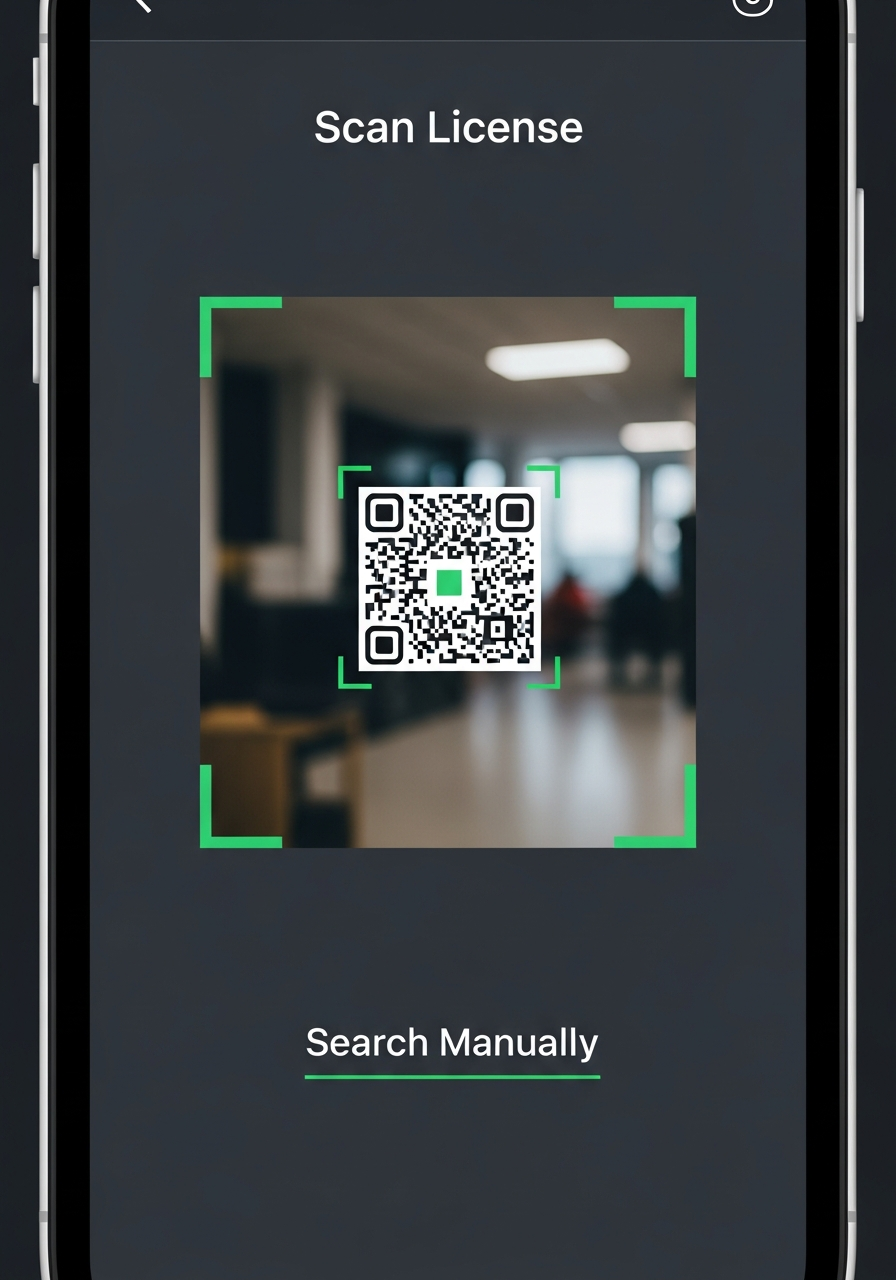
The scan takes less than a second. The system immediately pulls up the angler's license record.
Verify the Angler
After scanning, the verification screen shows you everything you need:
- The angler's photo — does the person in front of you match the photo?
- Their name
- The club that issued the license
- License type and expiry date
- Status — is the license active or expired?

A green "Valid License" badge means everything checks out. A red "Expired" or "Invalid" badge means there's a problem.
The photo is the key part — it stops people sharing permits. If the person fishing doesn't match the photo on the license, you know immediately.
Search Manually
Sometimes an angler's phone might be dead, or there might be poor signal. That's fine — you can still check their license.
From the License Checker, tap "Search Manually" and search by:
- Name — type the angler's name
- License number — if the angler remembers it

The system pulls up matching records with the angler's photo, so you can still verify their identity even without scanning a QR code.
Tip: The manual search works even with partial names. If an angler can give you their first and last name, you'll find them quickly.
The Key Principle
Angling Ireland doesn't control your club or your waters. Each club has their own section where they manage everything themselves:
- Set up and sell their own licenses
- Set their own prices and rules
- View their license holders
- Assign their own bailiffs
- Check licenses on their waters
Your club still runs everything — Angling Ireland simply provides the technology platform to make it easier, more secure, and more professional.